Introduction
Converting a live website to PDF sounds straightforward — point a renderer at a URL and save the result. In practice, modern websites throw a few curveballs: regional redirects that change the domain, cookie consent banners that obscure your content, and lazy-loaded images that won't appear unless you scroll.
In this tutorial we'll capture BBC.com as a complete, pixel-perfect PDF, tackling each problem one at a time and building up to a production-ready snippet you can adapt for any website.
bbc.com to bbc.co.uk, the homepage
shows a GDPR cookie banner, and most images are lazy-loaded. Solve these three problems and
you can capture almost any website.
Project setup
Create a new console app (or add to an existing project) and install the CobaltPDF NuGet package:
dotnet new console -n BBC-Capture
cd BBC-Capture
dotnet add package CobaltPdf
CobaltPDF bundles Chromium automatically via NuGet — there's nothing else to install.
Step 1 — Basic capture
Let's start with the simplest possible capture to see what we get:
using CobaltPdf;

await new CobaltEngine()
    .RenderUrlAsPdfAsync("https://www.bbc.com")
    .SaveAsAsync("bbc-basic.pdf");

Console.WriteLine("Done — saved bbc-basic.pdf");
Run it with dotnet run and open the resulting PDF. You'll notice two problems straight away:
- A cookie consent banner covers a portion of the page.
- Images below the fold are missing — the page uses lazy loading and CobaltPDF (like any headless browser) only renders the visible viewport by default.
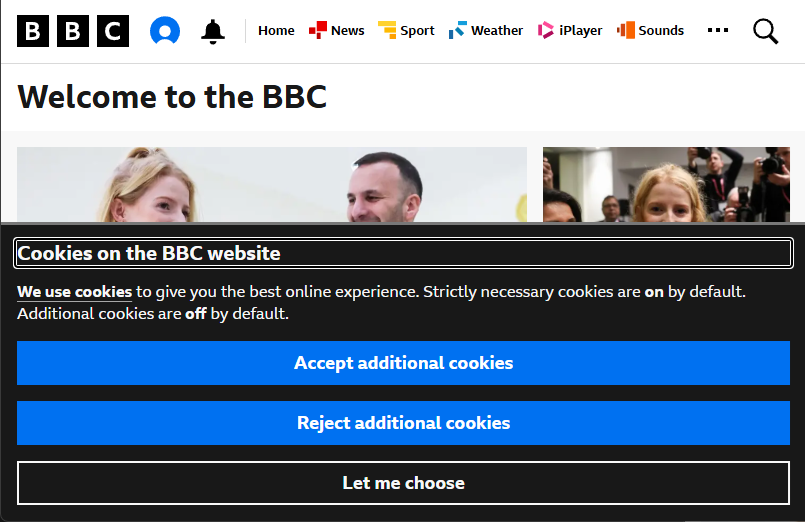
Let's fix these one at a time.
Step 2 — Dismissing the cookie banner
The BBC shows a GDPR cookie consent banner to every new visitor. In a headless browser there's
no stored consent, so it appears every time. The fix is to set the ckns_explicit
cookie to 1 — this tells the site the user has already made their choice:
using CobaltPdf;

await new CobaltEngine()
    .AddCookie("ckns_explicit", "1")    // dismiss cookie consent
    .RenderUrlAsPdfAsync("https://www.bbc.com")
    .SaveAsAsync("bbc-no-banner.pdf");
Notice we didn't specify a cookie domain. Because bbc.com redirects to
bbc.co.uk in the UK, a hardcoded .bbc.com domain wouldn't work.
When you omit the domain, CobaltPDF follows all redirects first, then sets the cookie on
whatever domain the page actually landed on. You can also set the domain explicitly with
.AddCookie("ckns_explicit", "1", ".bbc.co.uk") if you know it ahead of time.
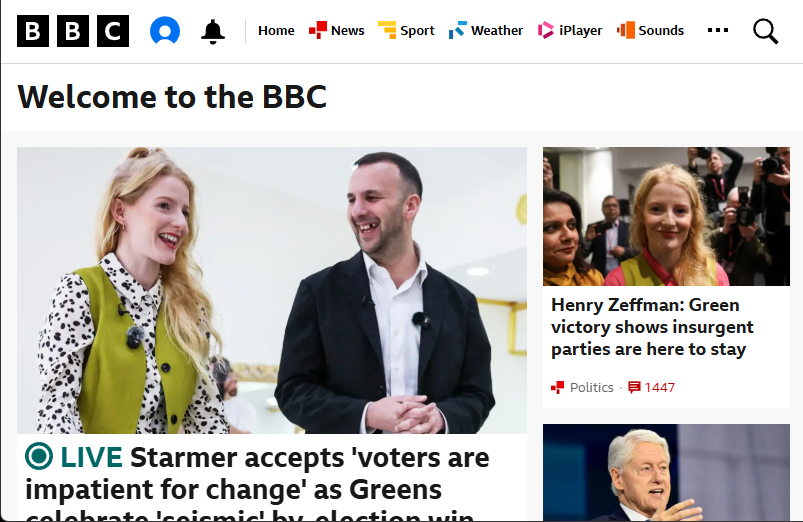
ckns_explicit=1 removes the banner completely.
Alternatively, if you don't know the consent cookie name, you can use
WithCustomJS to click the banner's accept button directly:
await new CobaltEngine()
    .WithCustomJS("document.querySelector('[data-testid=\"accept-button\"]')?.click();")
    .WithWaitStrategy(WaitOptions.ForJavaScript(
        "!document.querySelector('[aria-labelledby=\"consent-banner-title\"]')"))
    .RenderUrlAsPdfAsync("https://www.bbc.com")
    .SaveAsAsync("bbc-js-remove.pdf");
WithCustomJS clicks the accept button, but the banner takes a moment
to animate away. WithWaitStrategy tells CobaltPDF to keep polling a
JavaScript expression — here it checks that the consent banner element is no longer
in the DOM — and only proceeds with the PDF capture once it returns true.
CobaltPDF waits for the page to be fully loaded before running custom JavaScript, so the banner button is in the DOM when the click fires. The cookie approach is still preferred — it's simpler and prevents the banner from rendering at all.
WithCustomJS to click the dismiss button.
Step 3 — Capturing lazy-loaded content
Modern websites defer loading images and content below the fold until the user scrolls. In a headless browser, no scrolling happens — so those images are never loaded and appear as blank spaces in the PDF.
CobaltPDF's WithLazyLoadPages
method solves this by automatically scrolling through the page before capture. You specify
how many "pages" (viewport heights) to scroll, and CobaltPDF handles the rest.
using CobaltPdf;

await new CobaltEngine()
    .AddCookie("ckns_explicit", "1")
    .WithLazyLoadPages(5)              // scroll 5 viewport-heights
    .RenderUrlAsPdfAsync("https://www.bbc.com")
    .SaveAsAsync("bbc-lazy-loaded.pdf");

Console.WriteLine("Done — all images loaded");

WithLazyLoadPages(5) — every image is loaded and captured.Putting it all together
Here's the complete, production-ready snippet that combines everything we've covered:
using CobaltPdf;

var pdf = await new CobaltEngine()
    .AddCookie("ckns_explicit", "1")    // dismiss cookie consent banner
    .WithLazyLoadPages(5)              // scroll to load all lazy images
    .WithPrintBackground()              // include background colors and images
    .WithMetadata(m =>
    {
        m.Title  = "BBC Homepage";
        m.Author = "CobaltPDF Capture";
    })
    .RenderUrlAsPdfAsync("https://www.bbc.com");

await pdf.SaveAsAsync("bbc-complete.pdf");

Console.WriteLine($"Saved {pdf.Length / 1024}KB PDF");
This creates a CobaltEngine, sets a cookie to suppress the BBC's GDPR banner,
scrolls five viewport-heights to trigger every lazy-loaded image, enables background colors
in the output, stamps the PDF with custom metadata, and saves the result to disk.
Summary
We covered three common challenges when converting websites to PDF, and how CobaltPDF handles each one:
Regional redirects
Omit the domain in AddCookie and CobaltPDF follows redirects automatically, injecting cookies on the final domain.
Cookie consent banners
Set the site's consent cookie (e.g. ckns_explicit=1) to suppress the banner before it renders.
Lazy-loaded images
Use WithLazyLoadPages(n) to scroll through the page and trigger all deferred image loads.
Ready to try it yourself?